

Compare custom web applications and off-the-shelf software across cost, implementation speed, flexibility, integrations, scalability, security, ownership and long-term value.
Businesses often need software to manage customers, bookings, orders, staff, inventory, reporting or internal workflows. The first decision is whether to purchase an existing product or invest in a custom web application built around the organisation’s requirements.
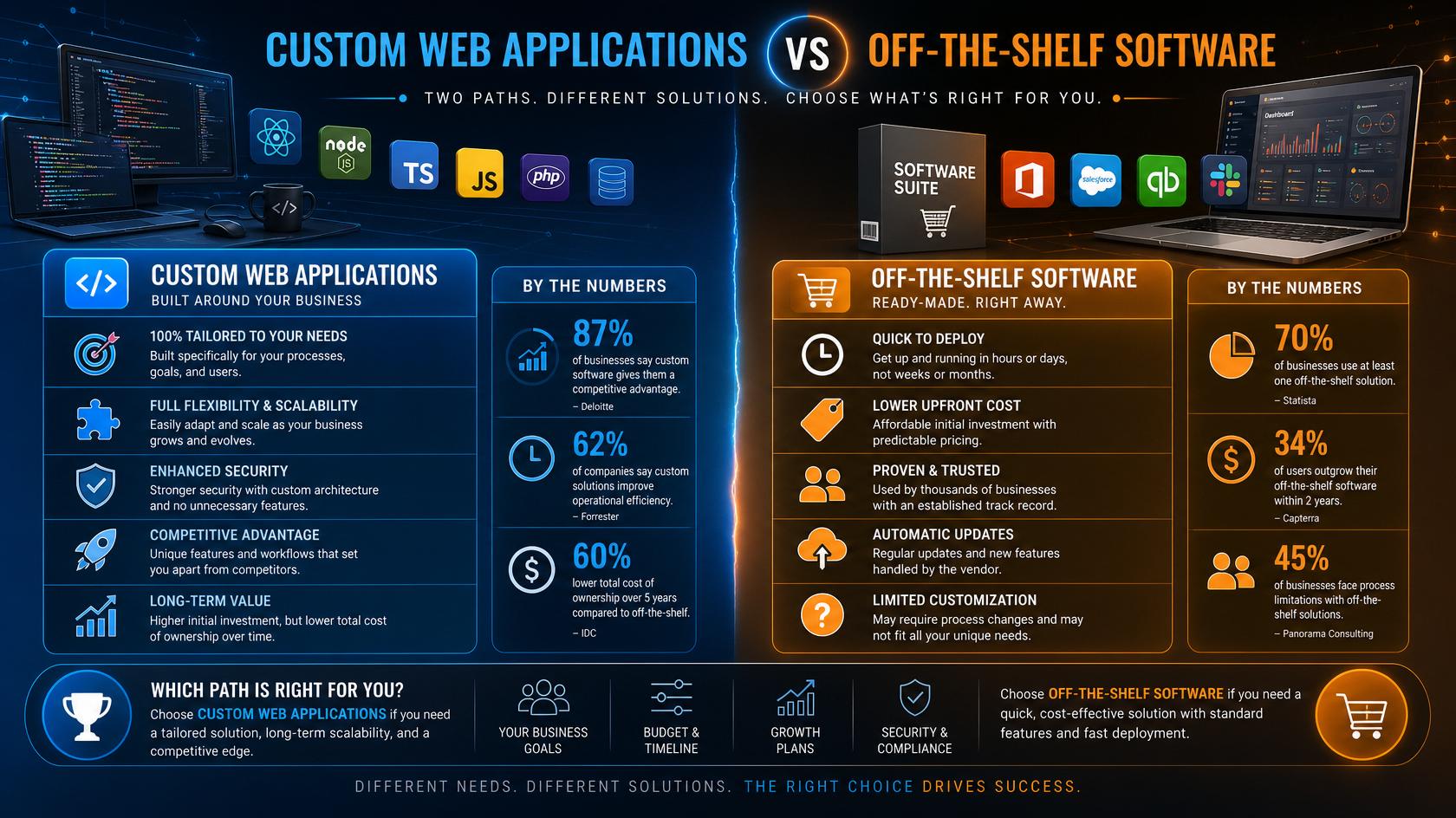
Off-the-shelf software can be faster and less expensive to start. Custom software can provide a closer operational fit, greater control and a long-term competitive advantage. The correct choice depends on process complexity, budget, growth plans, integration needs and the cost of adapting the business to the software.
WebCOSS develops custom websites, portals and web applications. Explore the relevant development services.
What Is Off-the-Shelf Software?
Off-the-shelf software is a ready-made product designed for many organisations. Examples include standard CRM, booking, project-management, ecommerce and accounting platforms. The business normally pays a subscription or licence fee and configures available settings, user roles and integrations.
Advantages
· Faster implementation when requirements are standard.
· Lower initial cost than building a complete platform.
· Established features, documentation and support resources.
· Regular updates managed by the software provider.
· Suitable for businesses willing to follow the product’s workflow.
Limitations
· The business may need to change its process to fit the software.
· Feature requests depend on the provider’s roadmap.
· Customisation and integration options may be limited.
· Subscription costs can increase with users, data or premium modules.
· Data portability and platform ownership may be restricted.
What Is a Custom Web Application?
A custom web application is designed around defined users, data and business rules. It can include dashboards, customer portals, staff tools, booking engines, workflow approvals, reporting, payments, notifications and API integrations. The organisation controls the feature roadmap and can develop the platform in phases.
Advantages
· The system follows the organisation’s real workflow.
· Features can be prioritised according to business value.
· Integrations can connect existing systems and reduce manual data entry.
· User roles, reporting and interfaces can be tailored precisely.
· The platform can become a proprietary business asset.
· Architecture can be planned for specific security and scalability needs.
Limitations
· Higher initial investment.
· Longer discovery, development and testing period.
· Ongoing responsibility for maintenance, hosting and security.
· Requires clear product ownership and decision-making.
· Poorly documented custom software can create supplier dependency.
Key Comparison Areas
Implementation Speed
Off-the-shelf software is normally quicker when the organisation can use the standard workflow. Custom development takes longer because requirements, interfaces, database structures and integrations must be designed and tested.
Cost
Ready-made software usually has a lower entry cost but may involve recurring subscriptions, add-ons, user fees and integration services. Custom software has a larger initial cost, followed by hosting, maintenance and future development. Compare the total cost over several years rather than the first invoice alone.
Flexibility and Control
Custom applications provide control over features, data, permissions and release priorities. Off-the-shelf products provide configuration within boundaries set by the vendor. The more unique the process, the more valuable customisation may become.
Integration
Many established platforms provide standard integrations. However, a custom application can connect unusual databases, legacy tools, supplier systems or internal APIs. Integration quality should be evaluated carefully because it affects data accuracy and daily operations.
Scalability
Both options can scale, but in different ways. A SaaS provider manages infrastructure within its plans and policies. A custom platform can be engineered around expected traffic, data and user growth, but the owner must fund and manage that growth responsibly.
Security and Compliance
Established products may have dedicated security teams, while a custom application can apply controls to a narrower and more specific use case. In both situations, businesses should review access control, data storage, backups, vendor responsibilities and legal requirements with qualified specialists.
Choose Off-the-Shelf Software When
· The business process is common and can follow standard workflows.
· Rapid implementation is the main priority.
· The budget cannot support custom development.
· Required integrations are already available.
· The business accepts the vendor’s pricing and product roadmap.
Choose a Custom Web Application When
· The workflow is unique or strategically important.
· Existing software creates significant manual work or duplication.
· Complex permissions, reporting or integrations are required.
· The platform will support a new digital product or revenue model.
· Ownership and long-term control are important.
Consider a Hybrid Approach
A business does not always need to replace every system. A custom portal can connect to an existing CRM, payment provider or accounting platform. This approach keeps proven software where it works and develops only the features that create distinct value.
Plan a Custom Application with WebCOSS
WebCOSS can help define requirements, user roles, workflows, integrations and phased development for a custom web application. Review a WebCOSS ecommerce project at https://webcoss.com/project/picknprint and discuss your software requirement.
Tell us about your project
Send the key details and WebCOSS will reply with practical next steps.
Need help planning or improving your digital platform?
WebCOSS can help translate your goals into a practical website, ecommerce, SEO or custom software roadmap.