

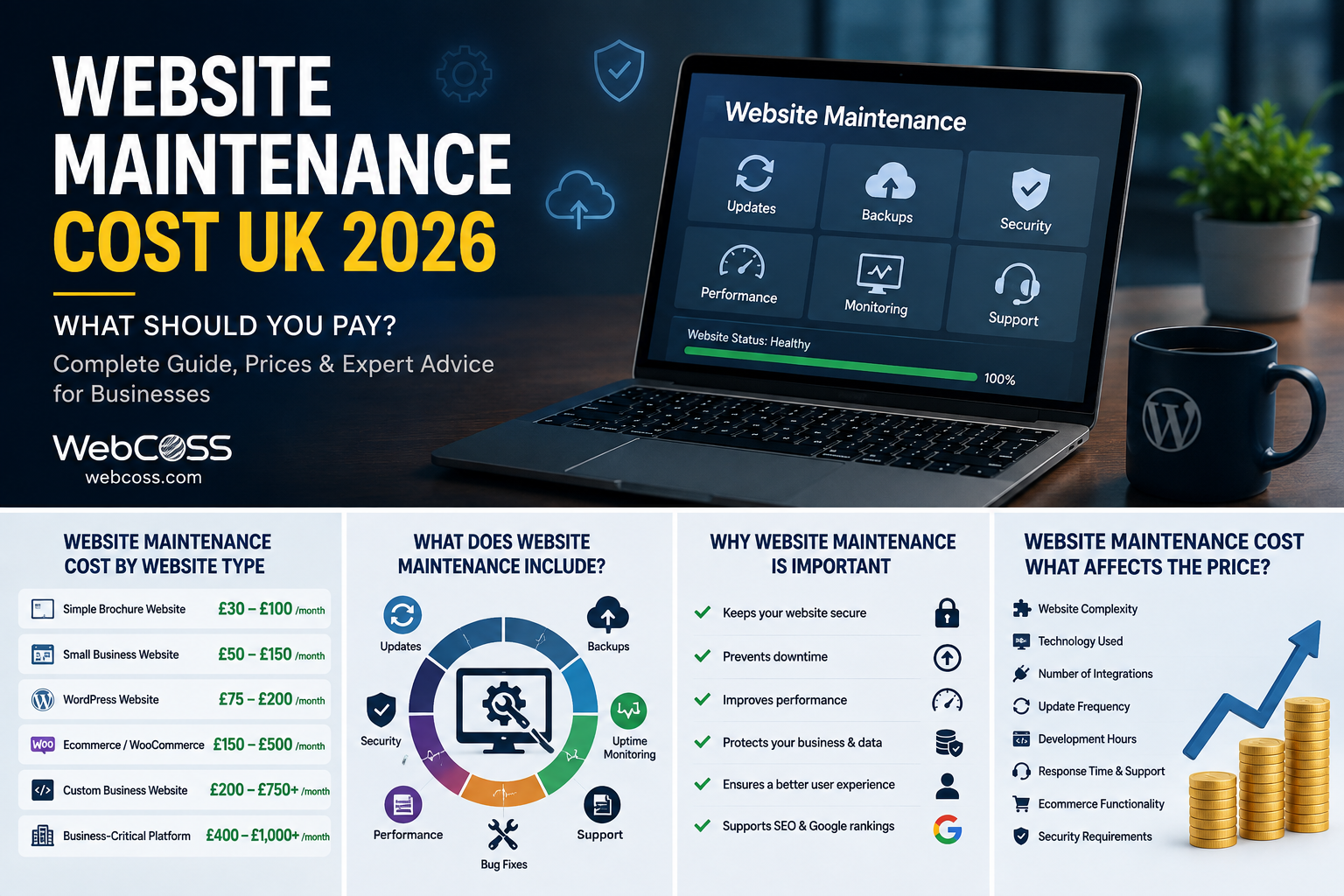
Wondering what website maintenance costs in the UK? This complete 2026 guide explains monthly website maintenance, WordPress support, security, hosting, backups, SEO, updates and the factors that determine ongoing website costs.
Launching a website is only the beginning. Once a business website goes live, it needs ongoing updates, security monitoring, backups, performance optimisation, technical support and regular testing to remain reliable.
That leads to an important question for business owners:
How much does website maintenance cost in the UK?
There is no single website maintenance price that applies to every business.
A small informational website has very different maintenance requirements from a busy WordPress website, WooCommerce store, membership platform or custom web application.
Rather than publishing a generic figure that may have little relevance to your website, this guide explains exactly what determines website maintenance costs in the UK, what should be included in a professional maintenance service, and how to decide what level of support your business actually needs.
WebCOSS provides website development, WordPress, performance, SEO and ongoing website support solutions for businesses that need reliable technical management of their digital platforms.
What Is Website Maintenance?
Website maintenance is the ongoing process of keeping a website secure, functional, updated, fast and compatible with changing browsers, devices, software and third-party services.
Maintenance can involve much more than occasionally changing text or images.
A professional website maintenance service in the UK may cover:
-
CMS updates
-
WordPress core updates
-
Plugin updates
-
Theme updates
-
Security monitoring
-
Malware checks
-
Website backups
-
Database maintenance
-
Performance optimisation
-
Uptime monitoring
-
Broken link checks
-
Form testing
-
Browser compatibility
-
Mobile testing
-
SSL monitoring
-
Technical SEO checks
-
Content updates
-
Bug fixes
-
WooCommerce maintenance
-
Integration monitoring
-
Technical support
The exact service should depend on the website and its importance to the business.
How Much Does Website Maintenance Cost in the UK?The cost of website maintenance in the UK depends on the amount of ongoing technical work required.
Instead of asking only:
“What is the cheapest monthly website maintenance cost?”
Businesses should ask:
“What maintenance does my website require to remain secure, fast and operational?”
The answer depends on several factors.
These include:
-
Type of website
-
Website size
-
CMS or technology
-
Number of plugins
-
Custom functionality
-
Ecommerce functionality
-
Traffic
-
Hosting environment
-
Security requirements
-
Frequency of content updates
-
Third-party integrations
-
Performance requirements
-
SEO requirements
-
Required response times
-
Development support requirements
A website maintenance company should ideally inspect the website before recommending an ongoing support arrangement.
What Determines Monthly Website Maintenance Cost?Monthly website maintenance cost is primarily determined by the amount of monitoring, preventive work, updates and technical support required each month.
Let's look at the major factors individually.
1. Type of Website
The type of website is one of the biggest factors.
Small Business Website
A straightforward business website may primarily require:
-
Software updates
-
Security checks
-
Backups
-
Uptime monitoring
-
Basic performance checks
-
Occasional content changes
WordPress Website
A WordPress website can require additional attention because WordPress installations commonly depend on multiple components.
These can include:
-
WordPress core
-
Theme
-
Plugins
-
Custom code
-
Hosting environment
-
Third-party integrations
Updates need to be managed carefully to avoid compatibility issues.
Ecommerce Website
An ecommerce website can require more ongoing attention because it directly supports transactions.
Maintenance may involve:
-
Checkout testing
-
Payment integration monitoring
-
Product functionality
-
Stock functionality
-
Order emails
-
Customer accounts
-
Shipping integrations
-
Security
-
Performance
-
WooCommerce updates
-
Plugin compatibility
Custom Website or Web Application
A custom PHP website, portal, booking platform or web application may require developer-level maintenance.
This can include:
-
Code updates
-
Server compatibility
-
Database maintenance
-
API monitoring
-
Security patches
-
Integration support
-
Application debugging
The complexity of the system generally has a greater influence on maintenance requirements than the number of visible pages alone.
WordPress Website Maintenance Cost UKWordPress website maintenance cost in the UK varies according to the complexity of the WordPress installation.
A basic WordPress website with a small number of carefully selected plugins may require relatively straightforward maintenance.
A larger website using:
-
WooCommerce
-
Page builders
-
Membership functionality
-
Booking systems
-
Custom plugins
-
Forms
-
CRM integrations
-
Marketing integrations
-
Multilingual functionality
can require significantly more technical management.
Professional WordPress maintenance should therefore be based on the actual configuration rather than simply the fact that the website uses WordPress.
The official WordPress documentation provides extensive information about maintaining and administering WordPress websites.
WordPress Website Cost UK vs Ongoing Maintenance CostSearchers sometimes use WordPress website cost UK and WordPress maintenance cost interchangeably, but they refer to different things.
The initial WordPress website cost relates to designing and developing the website.
Ongoing maintenance relates to keeping that website working properly after launch.
Businesses should therefore consider the complete website lifecycle:
Planning → Design → Development → Testing → Launch → Maintenance → Improvement
A professionally developed website still requires maintenance because the environment around it continues to change.
Browsers change. WordPress changes. Plugins change. PHP versions change. Security threats evolve. Business requirements change.
Website maintenance helps manage those changes.
What Should Monthly Website Maintenance Include?A professional monthly website maintenance service should focus on preventive maintenance as well as fixing problems.
Waiting until the website breaks is not an effective maintenance strategy.
Software Updates
CMS platforms, plugins, themes and other software components receive updates for reasons including:
-
Security
-
Compatibility
-
Performance
-
Bug fixes
-
New functionality
Updates should ideally be reviewed and tested rather than blindly applied.
Website Backups
Regular backups provide an important recovery mechanism.
A backup strategy should consider:
-
Website files
-
Database
-
Backup frequency
-
Storage location
-
Retention
-
Restoration testing
A backup that cannot be successfully restored has limited value.
Security Monitoring
Security maintenance may include:
-
Malware monitoring
-
File integrity checks
-
Login protection
-
Access reviews
-
Vulnerability monitoring
-
Software updates
-
SSL checks
-
Suspicious activity monitoring
The goal is to reduce risk and identify problems early.
Why Website Security Maintenance MattersWebsites are exposed to automated attacks, bots, spam and vulnerability scanning every day.
Security maintenance is especially important for websites using popular CMS platforms and third-party extensions.
Basic security practices can include:
-
Keeping software updated
-
Strong authentication
-
Appropriate file permissions
-
Secure server configuration
-
Regular backups
-
Input validation
-
Access control
-
HTTPS
-
Monitoring
The UK's National Cyber Security Centre provides cybersecurity guidance for UK organisations and businesses.
Security should be treated as an ongoing process rather than a feature that is completed once.
Website Backup and RecoveryBackups are one of the most important components of professional website maintenance.
They can help when a website is affected by:
-
Failed updates
-
Human error
-
Database problems
-
Server issues
-
Malware
-
Broken code
-
Accidental deletion
Businesses should also understand where backups are stored.
Keeping every backup only on the same server as the live website can create unnecessary risk.
Website Performance MaintenanceWebsites can gradually become slower over time.
Possible causes include:
-
Larger media libraries
-
Unoptimised images
-
Plugin additions
-
Database growth
-
Third-party scripts
-
Tracking tools
-
Poor caching
-
Hosting limitations
-
Inefficient code
Performance maintenance can include:
-
Image optimisation
-
Database cleanup
-
Caching reviews
-
Script optimisation
-
Plugin reviews
-
Core Web Vitals monitoring
-
Server performance checks
Google provides PageSpeed Insights for analysing website performance and user-experience metrics.
Core Web Vitals and Website MaintenancePerformance optimisation is not necessarily a one-time task.
New content, plugins, marketing scripts and design changes can affect page performance.
Important web performance measurements can include:
-
Largest Contentful Paint
-
Interaction to Next Paint
-
Cumulative Layout Shift
Website maintenance can therefore include periodically reviewing important pages and correcting new performance issues.
Website Uptime MonitoringIf your website becomes unavailable, you want to know before your customers do.
Uptime monitoring checks whether a website remains accessible.
For business-critical websites, monitoring can help identify:
-
Hosting outages
-
Server errors
-
DNS issues
-
SSL problems
-
Application failures
Monitoring does not prevent every outage, but it can reduce the time required to discover one.
SSL Certificate MonitoringHTTPS is now expected for professional websites.
Maintenance should ensure SSL certificates remain valid and correctly configured.
An expired or misconfigured certificate can result in browser warnings that immediately damage customer confidence.
Website Database MaintenanceDatabase-driven websites can accumulate unnecessary information over time.
Depending on the platform, this can include:
-
Revisions
-
Temporary data
-
Sessions
-
Logs
-
Transients
-
Spam
-
Abandoned records
Database maintenance should be carried out carefully and backed up beforehand.
Deleting data simply because it appears unnecessary can create problems if its purpose is not properly understood.
Plugin and Theme MaintenanceWordPress businesses often install plugins to add functionality.
However, every plugin becomes another component that may require:
-
Updates
-
Security monitoring
-
Compatibility testing
-
Performance review
Plugins that are no longer required should be evaluated and removed where appropriate.
Using fewer well-maintained dependencies can make a website easier to manage.
Website Content MaintenanceTechnical maintenance is only one part of keeping a website current.
Business information also changes.
Regular content updates can include:
-
Service information
-
Team details
-
Opening hours
-
Contact information
-
Images
-
FAQs
-
Case studies
-
Blog content
-
Product information
Outdated information can reduce customer confidence even when the website is technically functioning perfectly.
SEO Website Maintenance UKSEO is not necessarily finished when a website reaches Google.
Websites change, competitors change and search engines continue crawling your pages.
SEO website maintenance in the UK may include:
-
Broken link monitoring
-
Redirect checks
-
Indexation reviews
-
Sitemap checks
-
Metadata improvements
-
Internal linking
-
Content updates
-
Technical SEO monitoring
-
Structured data checks
-
Search Console monitoring
-
Page performance reviews
SEO maintenance is particularly important when website content is regularly added, removed or reorganised.
Broken Links and Redirect MaintenanceBroken internal links create a poor experience for visitors and search engines.
They can appear when:
-
Pages are deleted
-
URLs are changed
-
Products are removed
-
External websites change
-
Website migrations are incomplete
Regular maintenance can identify these problems and determine whether a link should be corrected, removed or redirected.
Website Form TestingContact forms are often one of the most important conversion points on a business website.
A form can look perfectly normal while emails silently stop arriving.
Maintenance should periodically test:
-
Contact forms
-
Quote forms
-
Newsletter forms
-
Booking forms
-
Login forms
-
Registration forms
Form testing should verify both the website submission and the destination process.
Mobile and Browser CompatibilityA website that worked correctly when it launched may encounter issues as browsers and devices change.
Regular maintenance can include testing important pages on:
-
Desktop
-
Tablet
-
Mobile
-
Chrome
-
Safari
-
Edge
-
Firefox
Testing should prioritise the website journeys that matter most to customers.
WooCommerce Website Maintenance UKWooCommerce websites have additional maintenance considerations because they support online transactions.
WooCommerce maintenance services in the UK may include:
-
WooCommerce updates
-
Payment gateway checks
-
Checkout testing
-
Product functionality
-
Cart testing
-
Customer account testing
-
Shipping rules
-
Transactional emails
-
Plugin compatibility
-
Database performance
-
Security
-
Backups
For an ecommerce business, website downtime can directly interrupt sales.
This makes preventive maintenance particularly valuable.
Ecommerce Website Maintenance Cost UKEcommerce website maintenance cost UK depends on the complexity and importance of the online store.
A store containing standard products and a conventional checkout may have different requirements from a platform using:
-
Subscriptions
-
Personalisation
-
Multiple currencies
-
B2B pricing
-
Complex shipping
-
Custom APIs
-
ERP integration
-
CRM integration
-
Warehouse systems
The more systems that depend on each other, the more important integration monitoring becomes.
Custom Website MaintenanceCustom-built websites need a different approach from standard CMS maintenance.
Maintenance can include:
-
PHP compatibility
-
Framework updates
-
Dependency updates
-
API changes
-
Database optimisation
-
Server configuration
-
Error logging
-
Security patches
-
Custom feature support
This is why businesses with bespoke platforms often benefit from ongoing access to developers who understand the codebase.
Website Hosting and MaintenanceHosting and maintenance are related but not identical.
Hosting provides the infrastructure that makes the website available online.
Maintenance involves managing the website itself.
Some maintenance services may also include hosting management, but businesses should check exactly what is covered.
Hosting considerations can include:
-
Server performance
-
Storage
-
Backups
-
Security
-
SSL
-
Traffic capacity
-
Uptime
-
Support
Domain names also require ongoing management.
Businesses should ensure:
-
Registrant information is controlled appropriately
-
Renewal details remain current
-
DNS records are correctly configured
-
Access credentials are protected
-
Domain renewals are not missed
A business should ideally retain control over its own important digital assets.
Monthly Website Maintenance vs Pay-As-You-Go SupportBusinesses typically choose between ongoing maintenance and reactive development support.
Monthly Website Maintenance
A monthly arrangement can be appropriate when the website is important to daily business operations.
It can provide regular:
-
Monitoring
-
Updates
-
Backups
-
Preventive maintenance
-
Technical checks
-
Support
Pay-As-You-Go Website Support
Reactive support can work for websites requiring very little ongoing intervention.
The limitation is that problems may not be identified until somebody notices them.
For business-critical websites, proactive monitoring generally provides better continuity.
Website Maintenance for Small Businesses UKSmall businesses may assume website maintenance is only relevant to large organisations.
In reality, smaller businesses can be particularly dependent on their websites.
A website may be responsible for:
-
New enquiries
-
Appointment requests
-
Online bookings
-
Product sales
-
Local search visibility
-
Customer information
A technical failure can therefore affect a small business immediately.
Small business website maintenance UK should focus on the areas that actually matter rather than unnecessary complexity.
Website Maintenance for Growing BusinessesAs businesses grow, their websites usually grow too.
New functionality may include:
-
CRM integration
-
Customer portals
-
Online payments
-
Bookings
-
Ecommerce
-
APIs
-
Automation
-
Additional landing pages
Maintenance requirements should be reviewed as the website becomes more complex.
A support arrangement suitable for a five-page website may no longer be suitable after it evolves into an important business platform.
How Often Should a Website Be Maintained?Maintenance frequency depends on the website.
Some activities can happen automatically or continuously, while others should be reviewed periodically.
For example:
Frequent Monitoring
-
Uptime
-
Security alerts
-
Critical errors
Regular Maintenance
-
Software updates
-
Backups
-
Form checks
-
Performance checks
Periodic Reviews
-
SEO
-
Content
-
Accessibility
-
User experience
-
Integrations
-
Technical architecture
A maintenance plan should be risk-based rather than simply following an arbitrary checklist.
What Happens If You Don't Maintain Your Website?Neglecting website maintenance can lead to:
-
Security vulnerabilities
-
Outdated plugins
-
Broken layouts
-
Failed forms
-
Slow loading
-
Browser compatibility problems
-
Broken integrations
-
SEO issues
-
Downtime
-
Poor customer experience
Not every neglected website will immediately fail.
The problem is that technical debt and risk can accumulate until something important breaks.
Website Redesign vs Website MaintenanceSometimes maintenance is no longer the right solution.
An older website may have fundamental limitations such as:
-
Outdated architecture
-
Unsupported software
-
Poor mobile design
-
Excessive plugins
-
Poor performance
-
Difficult administration
-
Unmaintainable custom code
In those situations, continuously patching the existing website may be less effective than redesigning or rebuilding it.
A professional developer should be able to explain when maintenance is sensible and when redevelopment should be considered.
How to Choose a Website Maintenance Company in the UKDon't choose a provider based solely on the lowest advertised monthly website maintenance price.
Ask what the service actually includes.
Questions worth asking include:
-
Are backups included?
-
Where are backups stored?
-
Are updates tested?
-
Is security monitoring included?
-
Is uptime monitored?
-
Are forms periodically tested?
-
Is performance monitored?
-
Does the service include development time?
-
What happens if an update breaks the website?
-
Is WooCommerce covered?
-
Are custom plugins supported?
-
Are third-party integrations monitored?
-
What response times apply?
-
Who owns the website and hosting accounts?
-
What happens when the website needs additional development?
A clearly defined service is more useful than an ambiguous promise of “unlimited maintenance”.
Why Cheap Website Maintenance Can Become ExpensiveThe lowest-cost option can be attractive, but businesses should understand what is being excluded.
A maintenance service that only presses an automatic update button may not provide:
-
Compatibility testing
-
Backup verification
-
Security monitoring
-
Performance optimisation
-
Developer support
-
Troubleshooting
The objective should be to reduce website risk and keep the platform useful to the business.
Why Choose WebCOSS for Website Maintenance?WebCOSS works across web development, WordPress, ecommerce, SEO, performance and custom web applications.
That means website maintenance can be approached from a development perspective rather than simply as a software-update service.
Depending on your website, support can cover areas such as:
-
WordPress maintenance
-
Website updates
-
Technical troubleshooting
-
Website performance
-
Security improvements
-
WooCommerce support
-
Custom development
-
Website SEO
-
API and integration support
-
Website improvements
Maintenance Based on Your Website
Different websites need different levels of support.
WebCOSS can assess the website's technology, functionality and business importance before determining an appropriate maintenance approach.
This avoids forcing every business into the same generic maintenance package.
WordPress Website Maintenance
For WordPress websites, maintenance can focus on maintaining compatibility between WordPress core, plugins, themes, custom code and hosting.
Ecommerce Maintenance
For ecommerce businesses, maintenance can additionally consider customer-facing functionality such as product pages, basket, checkout, payment integrations and transactional processes.
Custom Website Support
Custom platforms can require developer-level maintenance.
WebCOSS can support websites where troubleshooting requires understanding PHP, databases, APIs and custom application logic.
Performance Optimisation
Maintenance can also be used to identify performance problems introduced as the website evolves.
Instead of treating website speed as a one-time project, performance can be reviewed as part of the ongoing technical health of the site.
How to Request a Website Maintenance QuoteTo receive a meaningful website maintenance proposal, provide your developer with:
-
Website URL
-
CMS or technology
-
Hosting information
-
Important functionality
-
Ecommerce information
-
Custom plugins or code
-
Third-party integrations
-
Current problems
-
Required update frequency
-
Required content support
-
Business-critical website functions
The provider can then assess the technical requirements rather than guessing based on the number of pages.
If you're researching website maintenance cost UK, monthly website maintenance cost, WordPress website maintenance UK or ongoing technical support, visit WebCOSS to explore professional web development and support solutions.
Conclusion: What Should Website Maintenance Cost in the UK?There is no meaningful single answer to “How much does website maintenance cost in the UK?”
The correct level of investment depends on the website's complexity, technology, traffic, functionality and importance to the business.
A simple brochure website and a busy WooCommerce store should not have identical maintenance requirements.
Instead of selecting website maintenance purely by price, evaluate:
-
What is monitored
-
What is updated
-
What is backed up
-
What is tested
-
What support is included
-
How problems are handled
-
Whether developers are available when required
Professional website maintenance should help keep your digital platform secure, reliable, fast and useful to your customers.
For WordPress maintenance, ecommerce support, custom website development, technical SEO and ongoing website improvements, explore WebCOSS.
Frequently Asked Questions
Quick answers related to this article.
How much does WordPress website maintenance cost in the UK?
WordPress maintenance requirements vary considerably. A simple WordPress business website normally requires less technical management than a WooCommerce, membership or heavily customised WordPress platform.
Is website hosting included in website maintenance?
Not necessarily. Hosting and website maintenance are different services. Some providers combine them, while others manage them separately. Check exactly what is included before choosing a maintenance service.
What affects monthly website maintenance cost?
The biggest factors include website complexity, CMS, plugins, custom code, ecommerce functionality, third-party integrations, traffic, security requirements and the amount of ongoing development support required.
What is included in monthly website maintenance?
Monthly website maintenance can include software updates, backups, security monitoring, uptime checks, performance optimisation, form testing, broken-link checks, technical SEO monitoring and developer support.
How much does website maintenance cost in the UK?
There is no standard cost for every website. Website maintenance cost in the UK depends on the website's platform, size, functionality, security requirements, update frequency, ecommerce features, integrations and required level of technical support.
Tell us about your project
Send the key details and WebCOSS will reply with practical next steps.
Need help planning or improving your digital platform?
WebCOSS can help translate your goals into a practical website, ecommerce, SEO or custom software roadmap.